Bouxsaej neix caengz miz youq ndaw vah mwngz, ndigah yienh youq ndaw vah Yinghgoz.
Burn Subtitles Into a Video With ffmpeg: Checks for Translated Subtitles
Hardcode SRT or ASS subtitles with ffmpeg, then check one frame for missing fonts, misplaced Arabic punctuation, broken Hindi shaping, and encoding errors.

To burn subtitles into a video, render the subtitle file onto every frame and encode a new video. With ffmpeg that is one command:
ffmpeg -i input.mp4 -vf "subtitles=subs.srt" -c:v libx264 -crf 18 -c:a copy output.mp4
The text becomes part of the picture. Every viewer sees it on every player, and nobody can turn it off or switch language. That is why people burn translated subtitles: for social video, for a screen at an event, or for a platform that ignores subtitle tracks.
The command is the easy part. Translated subtitles fail in ways English ones don't. A missing font turns Chinese into boxes. Arabic punctuation lands at the wrong end of the line. A file saved in the wrong encoding stops the job. And once the subtitles are burned in, the only fix is to burn the video again from the original. So render one frame per language first and look at it.
We tested this with short SRT and ASS files in German, Chinese, Hindi and Arabic on two setups: macOS with a static ffmpeg 9.0 build, and a clean Ubuntu 24.04 container with ffmpeg 6.1.1. All the frames below come from those runs, and the test files and exact versions are free to download.
Check that your ffmpeg can burn subtitles
The subtitles filter needs ffmpeg built with libass. Not every build has it. On our Mac, Homebrew's ffmpeg 9.0.1 had no subtitles filter at all; a static 9.0 build did. Check before you plan around it:
ffmpeg -hide_banner -filters | grep -E " (subtitles|ass) "
If nothing prints, use a different build. Ubuntu's apt install ffmpeg included libass in our test.
Two things about the command itself:
- Burning always re-encodes the video. When we added
-c:v copyto keep the original video stream, ffmpeg refused: "Filtering and streamcopy cannot be used together." Pick a quality setting such as-crf 18instead. Audio is untouched, so-c:a copyis fine. - ASS files keep their styles. Pass an
.assfile to the samesubtitlesfilter, or use theassfilter, and the fonts, colors and positions in the file are used. In our styled ASS sample, a sign line placed with\posstayed where it was placed. If you are translating an ASS file, keep it as ASS until it is burned. Our ASS translation guide covers what to protect.
Render one frame per language first
Before you encode a 40-minute video, render a single frame from a moment where a subtitle is on screen:
ffmpeg -ss 00:01:05 -copyts -i input.mp4 -vf "subtitles=subs.srt" -frames:v 1 check.png
Keep -copyts in that command. Without it, seeking before -i restarts the video clock at zero, and the filter draws whatever cue sits at the start of the file instead of the one at 01:05. In our two-cue check, the same seek drew the first cue without -copyts and the right one with it. Putting -ss after -i also works, but ffmpeg then decodes everything up to that point.
Open check.png and look at it. Then search ffmpeg's log for this line:
fontselect: failed to find any fallback with glyph
It means libass could not find any font with that character. It drew a box instead and kept going. The command still exits normally, so a script that only checks the exit code will not notice.
Pick the test moment on purpose: the longest line, a line with numbers or punctuation at the end, and for bilingual files the cue with the most lines.
Fix missing characters: install a font or name one
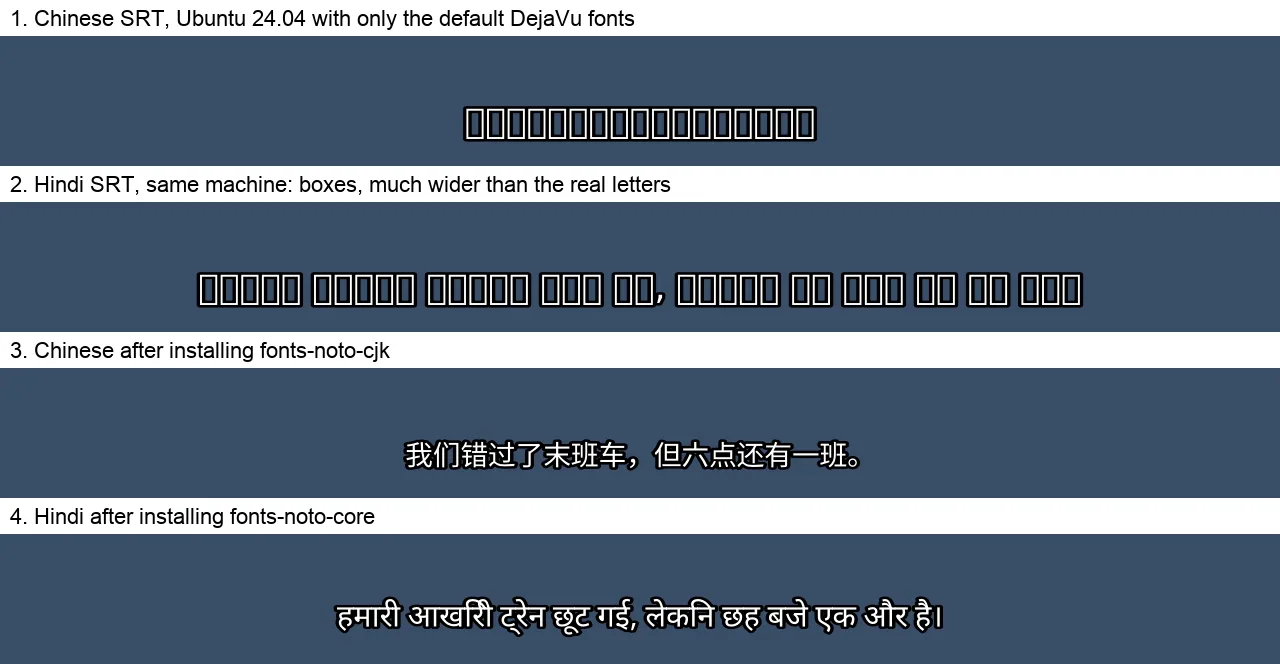
The Ubuntu container came with 8 DejaVu font files and nothing else. Chinese and Hindi came out as boxes. The Hindi boxes were also much wider than the real letters: the line of boxes spanned about 880 of the frame's 1280 pixels, where the correct Hindi line needed about 600, so lines wrap sooner and a cue takes more lines. Arabic happened to work, because DejaVu Sans includes Arabic letters.
After apt install fonts-noto-cjk fonts-noto-core, the same commands drew Chinese and Hindi correctly. That is the usual fix on a server or in a Docker image: install fonts for every target script before you burn.
On the Mac, the result surprised us. With the default Arial style, Arial itself drew the Arabic and Hindi fell back to a system font, but Chinese found no fallback. Every Chinese character was a box, and the log showed the same "failed to find any fallback" line. Naming a font fixed it:
ffmpeg -i input.mp4 -vf "subtitles=subs.srt:force_style='FontName=Hiragino Sans GB'" -c:v libx264 -crf 18 -c:a copy output.mp4
So don't rely on automatic fallback. Name a font that covers the target script, check that it exists with fc-list on Linux, or keep the fonts next to the job and point the filter at them with fontsdir=./fonts.
Arabic, Hebrew and Persian: check where the punctuation lands
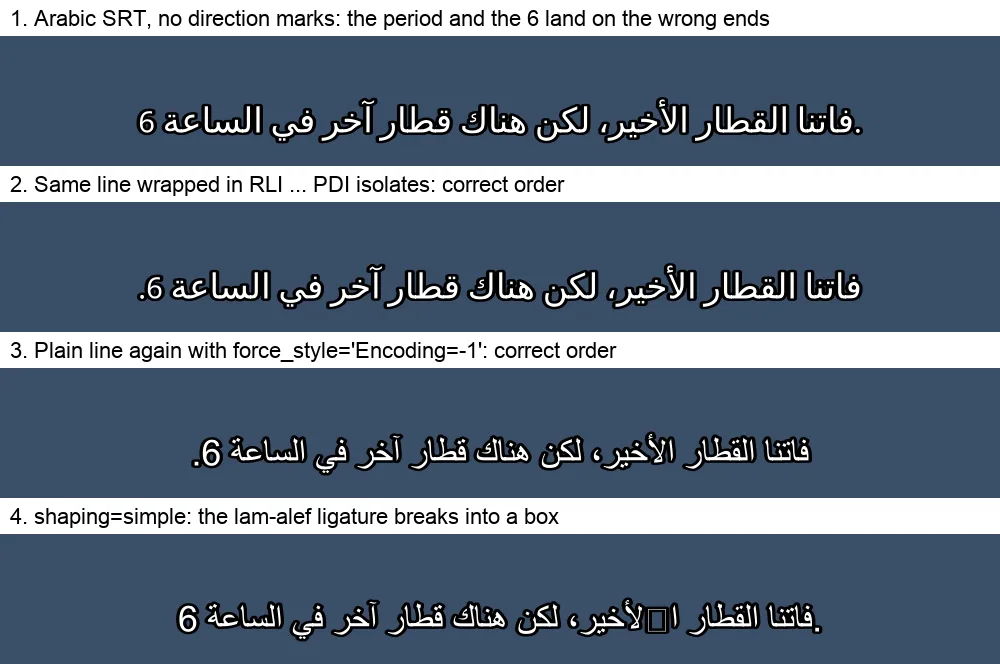
Our Arabic line ends with "6." (at six o'clock). Burned as plain text, the period ended up at the far right of the line and the 6 at the far left. The letters were right; the sentence ending was split across both ends (row 1, Ubuntu with Noto fonts).
Two fixes worked:
- Wrap each line in Unicode isolates. U+2067 (RLI) at the start and U+2069 (PDI) at the end tell the renderer the line is right to left. With them, the period and the 6 sat together at the left end, where they belong (row 2).
- Let libass detect the direction. Adding
force_style='Encoding=-1'to a plain file gave the same correct order on our Mac (row 3).
Do not set shaping=simple to speed things up. With it, the Arabic lam-alef pair turned into a box (row 4). Hindi broke too: the vowel sign ि, which is written before its consonant, was drawn after it, so आखिरी came out as आखरिी.
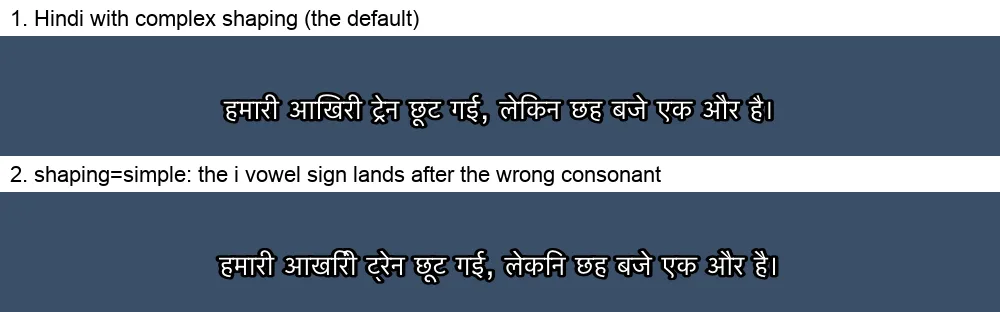
If you work on RTL books as well as video, our RTL book translation guide covers the same direction problems in text layout.
If the file isn't UTF-8, the burn stops
We saved the Chinese sample as GBK instead of UTF-8 and burned it without telling ffmpeg. It printed "Invalid data found when processing input", the filter failed to start, and no output file was written. Adding charenc fixed it:
ffmpeg -i input.mp4 -vf "subtitles=subs.srt:charenc=GBK" -c:v libx264 -crf 18 -c:a copy output.mp4
Better still, convert the file to UTF-8 once and burn that. Our subtitle encoding guide shows how to recognize the encoding and convert it.
Set size and position with force_style
force_style changes the look of SRT subtitles. Its numbers are not pixels. For an SRT file, ffmpeg builds a 384 × 288 script with Arial at size 16, and libass scales it to your video. So FontSize=18 is a bit larger than the default, not smaller. MarginV moves the text up from the bottom in the same units.
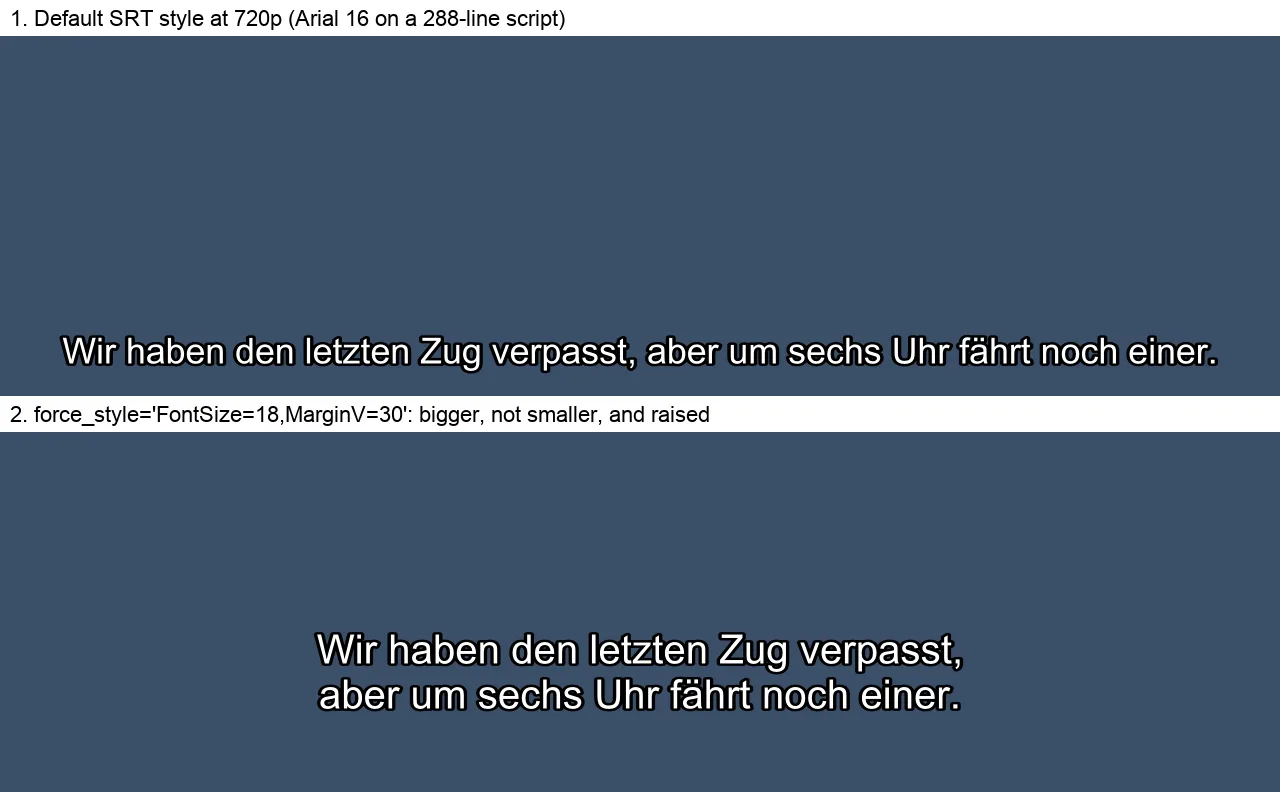
Line breaks depend on the font, too. Our German line had no manual break. At 1280 × 720 it fit on one line in Arial on the Mac, but wrapped to two lines in DejaVu Sans on Ubuntu, and to two lines on the Mac at size 18. Check the frame with the font you will actually ship.
Translations are often longer than the source, and a burned line can't be shortened later. Fix long lines in the subtitle file first; our AI subtitle translation guide covers line length and reading speed.
| What you want | force_style value we used | Note |
|---|---|---|
| A font that covers the target script | FontName=Hiragino Sans GB | The font must exist on the machine or in fontsdir |
| Correct RTL order in a plain file | Encoding=-1 | Not needed if lines carry RLI and PDI |
| Bigger text | FontSize=18 | Default is 16 in a 288-line script |
| Text higher in the frame | MarginV=30 | Same units as FontSize |
Bilingual subtitles: plan for four lines
Burning a bilingual file works the same way, but each cue can hold two lines of each language. That covers far more of the picture, and it is permanent. Before you burn one, read how to make bilingual subtitles: it covers which language goes on top, line limits, and when to shrink one language. Then render the cue with the most lines as your test frame.
When not to burn subtitles
Burning is the wrong choice when viewers need to switch language or turn subtitles off, or when you will ship several languages. Then keep the subtitles as a separate track or file. A player shows it, the video isn't re-encoded, and a wrong line can be fixed without touching the video.
If you prefer a desktop app, HandBrake can also burn subtitles. Its subtitle documentation says burned-in ASS keeps its styling, only one picture-based track (PGS or VobSub) can be burned in, and a wrong character code when importing an SRT leaves the output with no subtitle track. We did not test HandBrake; the frame-check habit above applies to it too.
Translate first, then burn
Burning only works with text that is already right, so translation comes first. BookTranslator's subtitle translator takes SRT, VTT, ASS and SSA files and writes the translation back into the same format with the original timing, plus a bilingual file. For Arabic, Hebrew, Persian and Urdu targets, it wraps each translated SRT line in the RLI and PDI marks that gave us correct order in the test above. It does not burn subtitles into video: run the ffmpeg command on your own machine once the subtitle file is final.
The order that avoids re-encoding twice:
- Translate the subtitle file and review it.
- Fix encoding and long lines in the file.
- Render one test frame per language and check fonts, direction and size.
- Burn the whole video.
If your subtitles are still inside a video file, extract them from the MKV or MP4 first.
Test files
Download the test notes and versions and the sample files: German, Chinese, Chinese in GBK, Hindi, Arabic, and Arabic with isolates. The lines were written by hand for this test, so they test rendering, not translation quality. We did not test Windows, video editors, online burners, or VTT input.
Okuthunyelwe Okuhlobene