Best DOCX Translation Tools: A Reproducible Comparison
Compare DOCX translation tools with the same stress test for styles, tables, comments, tracked changes, editable output, and review workflow.

Quick Verdict: The Best DOCX Translator Depends on the Document
For an ordinary Word file, start with the translation workflow already available to you and test the output. For a long or layout-sensitive DOCX, use a dedicated DOCX Translator and inspect the editable file. For professional localization with translation memory and human review, use a CAT or enterprise workflow.
There is no honest universal ranking without controlling the source file, language pair, settings, and review criteria. This guide provides a reproducible test and a current shortlist. It does not invent scores for outputs we did not collect.
| Need | Best starting category |
|---|---|
| Fast whole-document draft inside Word | Microsoft Word |
| Browser-based, file-in/file-out DOCX translation | Dedicated DOCX translator |
| Strong document translation with a commercial language platform | DeepL file translation |
| Quick document understanding and broad language availability | Google Translate documents |
| Translation memory, terminology, assignment, and human review | CAT software such as Trados |
What We Tested—and What We Did Not
We built two synthetic fixtures:
- DOCX formatting stress test: headings, list, pricing table, review examples, and field-update instructions.
- DOCX review stress test: real OOXML insertions, deletions, a range-anchored comment, reviewer metadata, and a numeric table.
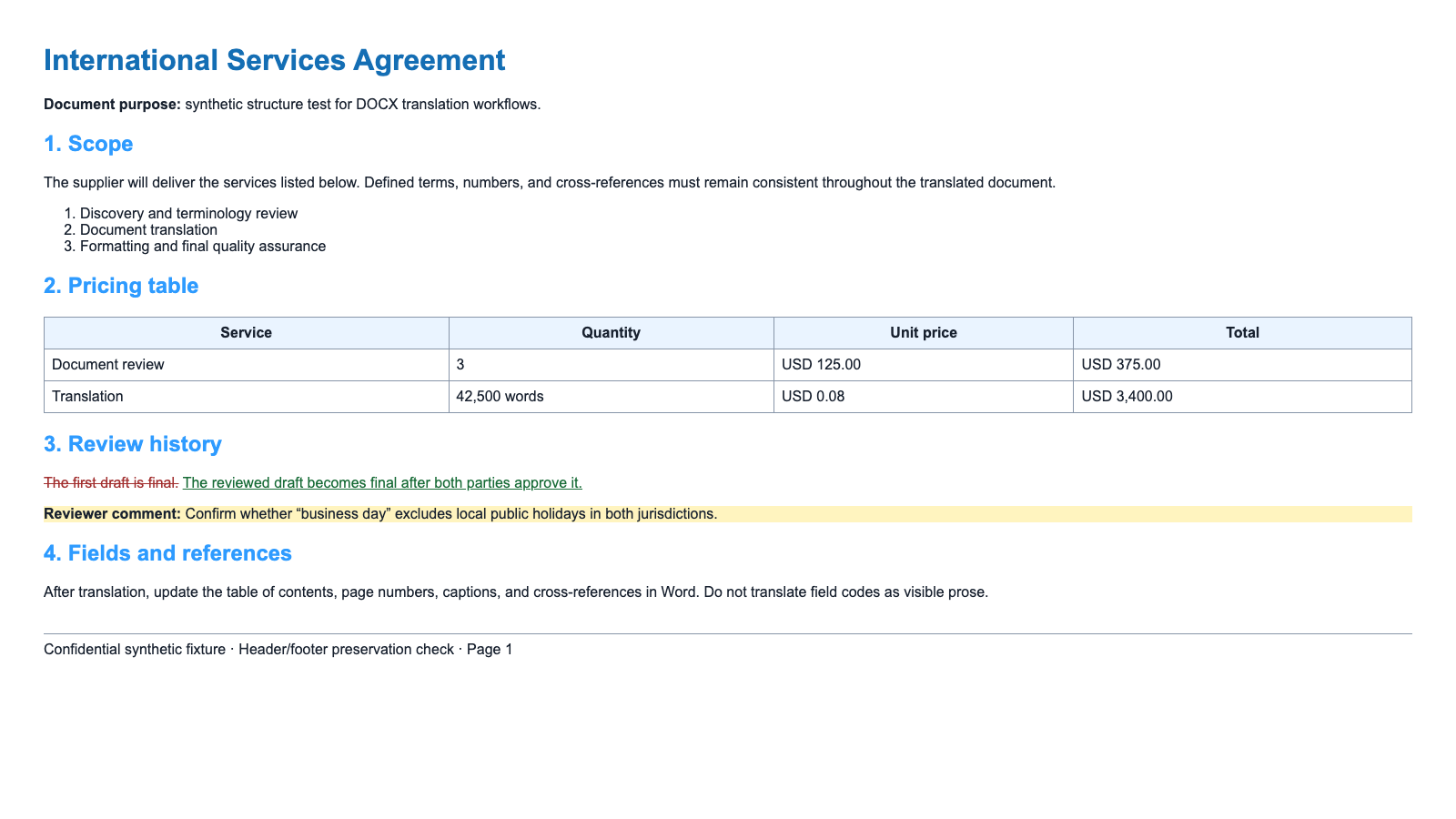
The fixtures let you compare tools on the same inputs. They do not contain proprietary customer content.
This article verifies documented workflow and defines the tests. It does not publish a fabricated winner, invented translation-quality score, or stale price table. Before making a purchase decision, run the files through the tools you can legally use and record the outputs.
DOCX Scoring Rubric
Score each category from 0 to 2:
| Category | 0 | 1 | 2 |
|---|---|---|---|
| Editable output | Flattened or unusable | Editable with major rebuild | Clean DOCX structure |
| Styles | Lost | Visual look retained but styles weakened | Named styles retained |
| Tables | Rows or values broken | Readable with cleanup | Structure and values retained |
| Headers/footers | Missing | Partial | Correct in every section |
| Comments | Missing/flattened | Present but anchors or metadata changed | Threads and anchors retained |
| Revisions | Missing/accepted silently | Visible but structurally altered | Real insertions/deletions retained |
| Numeric integrity | Values changed or moved | Minor formatting ambiguity | Values and relationships correct |
| Target-language layout | Clipped or unreadable | Some manual repair | Readable and consistent |
Keep translation quality as a separate human-review score. A structurally perfect DOCX can still contain bad language; a fluent translation can still return a broken file.
1. BookTranslator DOCX Translator: Best Starting Point for a Format-First Workflow
BookTranslator is our product. Its relevant advantage is the format-first workflow: upload a DOCX, select a language, and return to a translated document workflow rather than rebuilding pasted text.
Test it when:
- the final file must remain a Word document;
- the document is long enough that copy-paste is impractical;
- tables, headings, and lists matter;
- you want one product surface for DOCX and other document formats.
Do not assume every complex Word feature is preserved perfectly. Run the review fixture if comments or tracked changes are a requirement, and verify current limits on the product itself.
2. Microsoft Word: Best When You Want the Built-In Route
Microsoft documents a whole-document translation command in supported Word environments: Review → Translate → Translate Document. This is the lowest-friction starting point for many Microsoft 365 users.
Test it when:
- the source is already open in Word;
- you need a quick translated copy;
- your organization permits the connected translation experience;
- the document uses ordinary styles and tables.
Inspect comments, revisions, fields, and complex sections separately. A translated copy opening in Word does not prove that every review object survived.
3. DeepL Document Translation: Best When DeepL Fits the Language Pair and Workflow
DeepL file translation accepts document uploads. Its official documentation is the source to check for current formats, plan limits, and translated-file behavior. Those documented features make it a relevant candidate, not an automatic winner.
Test it when:
- DeepL supports the required source and target languages;
- the current plan supports the document size and workflow;
- you value its terminology or language controls;
- the file contains business prose and ordinary formatting.
Verify current plan limits and data-handling terms directly. Do not copy old quotas from comparison blogs.
4. Google Translate Documents: Best for a Quick Broad-Language Test
Google Translate's document workflow supports DOCX among its listed document types. Its official help documents current file constraints; use the same discipline here and verify the source is a normal Word file.
Test it when:
- you need quick comprehension;
- the language pair is available;
- the file fits current limits;
- the document is not a complex production deliverable.
Review tables, pagination, comments, and revision history rather than assuming a successful download means a successful DOCX translation.
5. CAT and Enterprise Workflows: Best for Controlled Human Review
Computer-assisted translation systems are designed around translation memory, terminology databases, segment status, assignment, review, and reuse across document versions.
Use this category when:
- several translators and reviewers are involved;
- the client requires a translation memory;
- revised source documents must be updated efficiently;
- terminology approval and audit history matter;
- a human editor owns final quality.
The trade-off is setup, cost, training, and sometimes imperfect round-tripping of unusual Word objects.
What Most Word Translator Lists Miss
Most lists compare language fluency on a plain paragraph. That avoids the hard parts of a DOCX.
A useful comparison must ask:
- Does the output remain editable?
- Are heading styles semantic or merely visual?
- Do tables retain cell relationships?
- Are document fields stale?
- Do comments remain anchored?
- Are revisions still revisions?
- Can the workflow recover after a partial failure?
- Does the target script have a usable font?
- Can another reviewer reproduce the same result?
If the article does not preserve or publish its test input, the ranking is difficult to audit.
Which Word Translator Should You Choose?
- Download the two fixtures above.
- Remove the review fixture if your real documents never use revisions.
- Choose one representative target language.
- Record the date, product, plan, settings, and output type.
- Score structure before reading language quality.
- Ask a qualified target-language reader to score accuracy and naturalness.
- Reject any tool with a blocker in numeric integrity or missing content.
- Choose the simplest workflow that passes your real requirements.
For source preparation and detailed Word QA, use how to translate a Word document while keeping the format. When comments or Track Changes matter, include the review fixture and reject any output that flattens, removes, or silently accepts them.
Dihlooho tse amanang