Fraktur-Texte per OCR erfassen: Erst das Original sichern, dann modernisieren
Nutzen Sie ein kleines, reproduzierbares Fraktur-OCR-Experiment, um Erkennungsfehler von der Normalisierung des langen s zu unterscheiden, bevor Sie ein altes Buch durchsuchen oder übersetzen.
Um gedruckte Frakturschrift per OCR zu erfassen, wählen Sie ein Modell, das diese Schriftart unterstützt, testen Sie einen kurzen Abschnitt am Original und entscheiden Sie, ob Ihr Transkript das lange s, ſ, beibehalten oder zu snormalisieren soll. Trennen Sie das geprüfte Ausgangstranskript strikt von Modernisierungen oder Übersetzungen. Ein vertrauter wirkendes Wort ist keineswegs automatisch eine treuere Wiedergabe des Drucks.
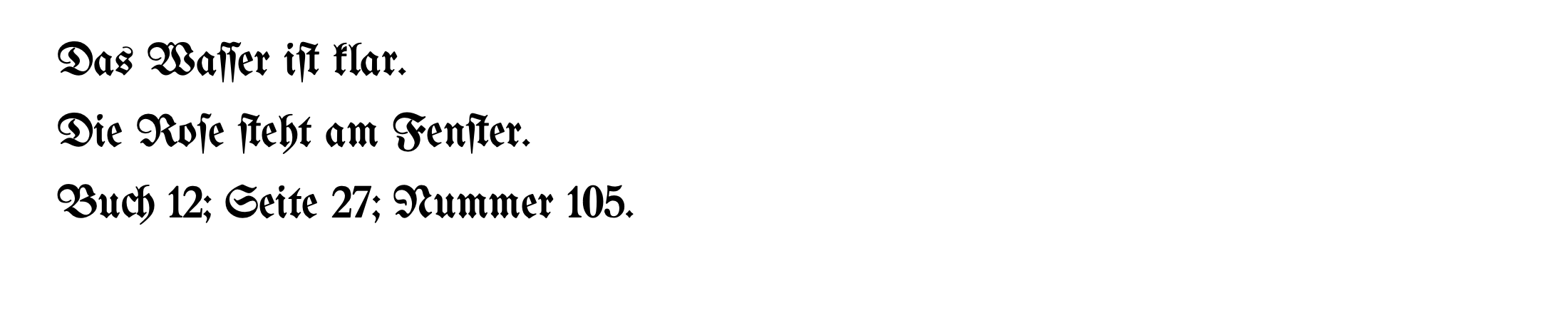
Wir haben zwei kurze, eigens verfasste deutsche Passagen in einer Frakturschrift sowie eine Kontrollversion in moderner Schrift getestet. Selbst bei diesen gestochen scharfen Bildern änderte das Fraktur-Modell iſt in einem Textabschnitt zu ift und im anderen zu if . Das wertvolle Ergebnis war keine Rangliste der Tools, sondern der praktische Beweis: Die Zeichenerkennung, die Wahl der Transkriptionskonvention und die sprachliche Modernisierung sind drei völlig unterschiedliche Aufgaben.
Dieser Leitfaden bezieht sich auf gedruckte Seiten. Er stellt keinen Workflow für handschriftliche Kurrent- oder Sütterlinschrift, beschädigte Manuskripte oder ganze historische Sammlungen dar.
Legen Sie vor dem OCR-Lauf fest, was als korrekt gilt
Formulieren Sie einen einzeiligen Transkriptionsgrundsatz, bevor Sie Tools vergleichen. Zum Beispiel: „Originalschreibung und langes s beibehalten; nicht verifizierbare Wörter kennzeichnen.“ Andernfalls werten Sie eine bewusste Normalisierung womöglich als Fehler – oder akzeptieren eine ungewollte Umformulierung, nur weil sie flüssig lesbar ist.
OCR-D liefert ein anschauliches Beispiel für diesen Unterschied. Dessen Level-1-Richtlinien geben langes s und Rund-s einheitlich als s; Level 2 und 3 unterscheiden hingegen zwischen ihnen. Hierbei handelt es sich um Transkriptionskonventionen, nicht um die Anweisung, jede historische Schreibweise durch ihre moderne Entsprechung zu ersetzen. Siehe dazu die offiziellen Level-1-Regeln zum s sowie die Level-2/3-Regeln zum s.
Trennen Sie bei einem privaten Leseprojekt die folgenden Ausgabeformen voneinander:
| Ausgabe | Beispiel aus unserem Lehrbeispieltext | Verwendungszweck |
|---|---|---|
| Quellenorientiertes Transkript | Die rothe Blume ſteht hier. | Abgleich der erkannten Zeichen mit dem Bild |
| Langes-s-normalisiertes Derivat | Die rothe Blume steht hier. | Suchen oder Lesen ohne Unterscheidung des langen s |
| Modernisiertes Derivat | Die rote Blume steht hier. | Eine separate editorische Fassung mit angepasster Rechtschreibung |
Die zweite Zeile ändert lediglich ſ in s; sie setzt nicht alle OCR-D-Level-1-Regeln um. Die dritte Zeile passt zudem die historische Rechtschreibung an. Keines der beiden Derivate sollte das quellenorientierte Transkript stillschweigend ersetzen.
Ersetzen Sie insbesondere den Buchstaben f nicht pauschal durch s. Unsere fehlerhafte OCR-Ausgabe enthält zwar ift, aber ein echtes f kann in der Vorlage durchaus vorkommen. Korrigieren Sie das Wort anhand des Bildes, nicht über eine pauschale Ersetzungsregel.
Was bei unserem Experiment mit acht Durchläufen geschah
Am 11. September 2026 haben wir zwei originale, dreizeilige Übungstexte in UnifrakturMaguntia und Noto Sansgerendert. Jedes Bild wurde mit zwei festgelegten Tesseract-Modellen texterkannt: dem Frakturschrift-Modell tessdata_best und dem englischen Modell. Die englische Konfiguration dient als Kontrast, nicht als moderne deutsche Baseline.
Alle acht Aufrufe nutzten Tesseract 5.5.3, den LSTM-Modus (--oem 1), einen einzelnen Textblock (--psm 6) und 300 dpi. Wir haben die Einstellungen nicht verändert, keine Ergebnisse ausgeschlossen und die Erkennung innerhalb des ursprünglichen Experiments nicht wiederholt. Ein Replay des gesamten Pakets am 12. September mit denselben acht Bildern reproduzierte die gespeicherten Output-Bytes exakt.
Die Bilder wurden authentisch mit Apple CoreText und aktivierten Ligaturen gerendert, nicht als unverbundene Zeichenboxen gezeichnet. Sie verwenden 64-Pixel-Text auf einer weißen Arbeitsfläche von 2200 × 460 Pixeln. Die Bilder, Glyphenzählungen, Schriftlizenzen, Modell-Hashes und Rohausgaben sind in der Anleitung zum Experiment-Paket.
Auch ein spezialisiertes Modell benötigte noch Korrekturen
Die erste Quellzeile lautete:
Das Waſſer iſt klar.
Auf dem Bild mit der Frakturschrift lieferte das Frakturmodell:
Das Waſſer ift klar.
Der Großteil der Zeile blieb erhalten, aber ſ in iſt wurde zu f. Im zweiten Abschnitt wurde Das Thal iſt weit. zu Das Thal if weit.: Die Erkennung veränderte ein Zeichen und ließ ein anderes ganz weg. Das bloße Gegenlesen auf plausibles Deutsch ersetzt nicht den Abgleich mit dem Original.
Bei der Kontrollprobe in moderner Schrift trat ein anderer Fehler auf. Das Frakturmodell behielt zwar die Wörter des ersten Abschnitts bei, ersetzte jedoch die beiden Semikolons in Buch 12; Seite 27; Nummer 105. durch Doppelpunkte. Hätte man nur das lange s überprüft, wären diese Änderungen an der Zeichensetzung unbemerkt geblieben.
Die Zielreferenz verändert das Ergebnis
Wir haben jede Rohausgabe mit zwei vor der Erkennung festgelegten Zielreferenzen abgeglichen: dem exakten Quelltext und dem Quelltext, bei dem ausschließlich ſ → s. Beide Vergleiche normalisieren Unicode nach NFC und fassen Whitespace zusammen; Groß-/Kleinschreibung und Zeichensetzung bleiben erhalten. Wir bereinigen oder vereinheitlichen die Rohausgabe vor der Auswertung nicht zusätzlich.
Die folgenden Zahlen stellen die Zeichen-Editierdistanzen dar – Einfügungen, Löschungen und Ersetzungen – und keinen prozentualen Genauigkeitswert.
| Abschnitt | Gerenderte Schriftart | OCR-Modell | Korrekturen gegenüber exakter Quelle | Korrekturen gegenüber Zieltext mit rein normalisiertem Lang-s |
|---|---|---|---|---|
| Langes s und Ziffern | Fraktur | Fraktur | 1 | 6 |
| Langes s und Ziffern | Fraktur | Englisch | 8 | 8 |
| Langes s und Ziffern | Noto Sans | Fraktur | 2 | 8 |
| Langes s und Ziffern | Noto Sans | Englisch | 7 | 7 |
| Historisch wirkende Schreibweise | Fraktur | Fraktur | 2 | 4 |
| Historisch wirkende Schreibweise | Fraktur | Englisch | 7 | 7 |
| Historisch wirkende Schreibweise | Noto Sans | Fraktur | 0 | 3 |
| Historisch anmutende Schreibweise | Noto Sans | Englisch | 4 | 4 |
Die Null in einer Zeile bedeutet eine exakte Übereinstimmung für diesen einen kurzen Textabschnitt. Sie sagt nichts über die nächste Seite eines echten Buches aus. Umgekehrt erhält ein Modell, das ſ korrekt beibehält, zusätzliche Abweichungen im Vergleich zu einer Zielvorgabe, die sverlangt. Diese Unterschiede beschreiben eine abweichende Richtlinie, nicht zwingend eine Fehlerkennung.
Prüfen Sie alle ursprünglichen Ausgaben und Bewertungen, die festen Quelltexte und Bewertungsrichtlinienoder das Verifizierungsskript. Das Paket erfasst SHA-256-Hashes, damit Modell, Bild und Ausgabe jedem Ergebnis eindeutig zugeordnet werden können.
Was dieses Experiment nicht aussagen kann
Hierbei handelt es sich um zwei saubere, groß gesetzte, synthetische Textauszüge – nicht um Scans einer alten Ausgabe. Wir haben weder verblasste Tinte, Kleingedrucktes, Bundstege, Spalten, beschädigtes Papier, Handschriften noch unabhängige menschliche Transkriptionen getestet. Ebenso wenig haben wir ein modernes deutsches Modell, kommerzielle OCR-Tools oder die OCR- und Übersetzungsergebnisse von BookTranslator getestet.
Betrachten Sie die Beispiele als Anlass, Ihr eigenes Material genau zu prüfen, und nicht als Schätzung für Fehlerraten ganzer Bücher. Auf Basis dieser Tabelle würden wir keinen OCR-Dienst für eine historische Sammlung auswählen.
Führen Sie einen begrenzten Test mit den Seiten durch, die Sie tatsächlich benötigen
Wenn Sie Tesseract lokal verwenden, dokumentieren Sie die Version der Engine und die genaue Modelldatei, bevor Sie Ausgaben vergleichen. Ein Modellname allein identifiziert die heruntergeladene Datei nicht eindeutig. Unser Herkunftsnachweis verlinkt die festgelegten öffentlichen Modell- und Schriftquellen; die großen Modelldateien sind dem Artikel nicht beigelegt.
Für unser Beispielbild mit einem einzelnen Textblock, bei dem das Frakturschrift-Modell lokal gespeichert war als models/Fraktur.traineddata, lautete der Befehl:
tesseract samples/long-s-fraktur.png stdout --tessdata-dir ./models -l Fraktur --oem 1 --psm 6 --dpi 300
Die Befehlszeilen-Dokumentation von Tesseract erläutert den LSTM-Modus und die Annahme eines einzelnen einheitlichen Textblocks bei PSM 6. Diese Annahme passt zu unserem dreizeiligen Bild. Sie ist jedoch keine Empfehlung, jede mehrspaltige Buchseite mit PSM 6 zu verarbeiten.
Beginnen Sie bei Ihrem eigenen Buch mit einer Textstelle, die Sie sicher transkribieren können, und einer schwierigeren Seite, die repräsentativ für das benötigte Material ist. Berücksichtigen Sie dabei einen Namen oder unbekannten Begriff, eine Zahl sowie wechselnde Schriftarten. Falls ein Buch Schriftarten oder Sprachen abwechselt, nutzen Sie den separaten Leitfaden für mehrsprachiges PDF-OCR , anstatt anzunehmen, dass ein sauberer Fraktur-Absatz für das gesamte Dokument ausreicht.
Belassen Sie den Scan unverändert. Speichern Sie das rohe OCR-Ergebnis getrennt von den Korrekturen und notieren Sie die Seiten- oder Bildkennung für jeden geprüften Abschnitt. Wenn die Ausgabe unleserlich ist, überprüfen Sie das Seitenbild und die Segmentierung erneut, bevor Sie den Auftrag auf Hunderte von Seiten ausweiten.
Korrigieren Sie das Transkript, ohne fehlende Wörter frei zu erfinden
Verwenden Sie ein einfaches Korrekturprotokoll mit vier Spalten: Quellstelle, Roh-OCR, geprüfte Lesart und Begründung. Die Begründung sollte klar zwischen einem sichtbaren Zeichenfehler und einer redaktionellen Anpassung unterscheiden.
| Beobachtung | Sinnvolle Maßnahme | Zu vermeidende Maßnahme |
|---|---|---|
Das Bild zeigt eindeutig iſt; OCR liefert ift | Diesen Einzelfall anhand des Bildes korrigieren | Jedes Vorkommen von f im gesamten Dokument pauschal ersetzen |
OCR übernimmt getreu rothe, Sie bevorzugen jedoch rote für den Lesefluss | Die Quellform beibehalten und eine entsprechend gekennzeichnete, modernisierte Version anlegen | Modernisierungen als OCR-Fehlerkorrektur verbuchen |
| Eine Zahl oder ein Satzzeichen weicht ab | Diese Stelle auch dann prüfen, wenn der umgebende Satz flüssig klingt | Nur ungewöhnliche Buchstabenformen überprüfen |
| Das Bild ist tatsächlich unleserlich | Unsicherheiten im Arbeitstranskript kennzeichnen und den Bildverweis beibehalten | Ein plausibel generiertes Wort als wiederhergestellten Beleg akzeptieren |
Wenn sich Text in einem heruntergeladenen PDF bereits markieren lässt, vergleichen Sie den eingefügten Text mit dem Bild, bevor Sie von vorn beginnen. Die PDF-Copy-Paste-Fehlerdiagnose erklärt, warum eine sichtbare Seite korrekt aussehen kann, während der verborgene oder zugeordnete Text fehlerhaft ist. Das ist ein anderes Problem als die Auswahl eines Modells zur Frakturerkennung.
Belassen Sie es bei einem verlässlichen Ausgangstext, wenn Durchsuchbarkeit, Zitatprüfung oder das Lesen des deutschen Originals bereits das gesamte Ziel waren. Eine Übersetzung ist kein zwingend erforderlicher Bereinigungsschritt.
Nur übersetzen, wenn die Sprache weiterhin das Hindernis darstellt
Für Leser, die eine andere Sprache benötigen, ist der geprüfte Ausgangstext der Punkt, an dem eine Übersetzung sinnvoll wird. Halten Sie Scan, geprüftes Transkript und Übersetzung klar voneinander getrennt, damit Sie bei strittigen Passagen nachvollziehen können, ob der Fehler bei der Erkennung oder der Übersetzung entstand. Der Workflow für gescannte PDF-Übersetzungen beschreibt diese weiterführende Übergabe.
Wenn Sie sich für den PDF-Übersetzer von BookTranslatorentscheiden, testen Sie zunächst einen repräsentativen Abschnitt Ihres Dokuments, bevor Sie sich auf das Gesamtergebnis verlassen. Unser Experiment verifiziert nicht , wie BookTranslator mit historischer Frakturschrift umgeht. Der OCR-Modus erstellt ein bereinigtes Dokument neu und kann dabei das ursprüngliche Seitenlayout, Schriftarten und Schriftgrößen verändern; betrachten Sie diese Ausgabe daher nicht als Faksimile und gehen Sie nicht davon aus, dass originale Seitenverweise unverändert erhalten bleiben.
Die praktische Vorgehensweise ist einfach: Verifizieren Sie die Lesart des Originals, kennzeichnen Sie Normalisierungen und übersetzen Sie erst bei Bedarf. Sprachliche Glättung gehört an das Ende dieses Prozesses – und darf die Belege am Anfang keinesfalls ersetzen.
Verwandte Beiträge