OCR japanskog okomitog teksta: Očuvajte redoslijed stupaca i upravljajte furiganom
Izvucite japanski okomiti tekst s odgovarajućim postavkama izgleda, odvojite furiganu od glavnog teksta i provjerite stvarne OCR rezultate u odnosu na uzorke koji se mogu preuzeti.
Za OCR japanskog okomitog teksta provjerite smjer pisanja prije promjene filtara slike. Koristite japanski model i postavku segmentacije koja može obraditi okomiti tekst, provjerite stupce u željenom redoslijedu i odlučite trebate li samo glavni tekst ili i furiganu. Stranica puna prepoznatljivih znakova i dalje može biti neupotrebljiv prijepis ako im je redoslijed pogrešan.
Proveli smo mali, ponovljiv lokalni eksperiment kako bismo te odluke učinili konkretnima. Vodoravna konfiguracija pomiješala je naša tri okomita stupca. Okomita konfiguracija oporavila je običan glavni tekst, ali dodavanje furigane promijenilo je dva interpunkcijska znaka, a izrezivanje rubija nije uklonilo pogreške u interpunkciji.
To su rezultati namjerno malog sintetičkog uzorka, a ne tvrdnja o točnosti za sve japanske knjige. Korisna pouka je uža: odvojeno procijenite prepoznavanje znakova, redoslijed čitanja i rukovanje bilješkama. Nemojte slati rezultat na prevođenje samo zato što izgleda kao japanski.
Prvo identificirajte tekst koji zapravo želite
U konvencionalnom japanskom okomitom slogu znakovi napreduju niz redak, a retci idu s desna na lijevo. Ruby je manji tekst povezan s osnovnim znakovima; furigana obično daje njihov izgovor. W3C-ovi Zahtjevi za prijelom japanskog teksta opisuju ove smjerove pisanja i ruby odnose.
Prije OCR-a označite smislena područja stranice:
- glavni okomiti stupci;
- mali ruby uz glavni tekst;
- vodoravni naslovi, natpisi ili tablice;
- brojevi stranica i živa zaglavlja;
- rubne bilješke ili nepovezane susjedne stranice.
Nemojte tretirati svaku okomitu traku kao neovisan odlomak. Traka malog kana pisma pokraj 図書館 može biti njegovo čitanje, としょかん, a ne sljedeća rečenica.
Odaberite pravilo izlaza prije ocjenjivanja OCR-a:
| Zadatak čitatelja | Željeni rezultat | Što se računa kao problem |
|---|---|---|
| Pretražite ili prevedite tekst | Glavni tekst redoslijedom; korisna čitanja spremljena zasebno | Ruby umetnut u prozu, izostavljeni tekst tijela, promijenjen redoslijed stupaca |
| Proučite izgovor | Glavni tekst plus ispravno pridružena čitanja | Nedostaje ruby ili je čitanje pridruženo pogrešnoj riječi |
| Izradite vjernu transkripciju | Sačuvani glavni tekst, odnosi s bilješkama i uredničke odluke | Tiho brisanje ili normalizacija materijala koji ste namjeravali zadržati |
Isti izlaz može proći jedan zadatak, a pasti drugi. Naš eksperiment koristi transkripciju samo tijela teksta kao svoj cilj usporedbe. Ne smatra da je nedostajući furigana prihvatljiv za izdanje namijenjeno proučavanju izgovora.
Pravi OCR eksperiment s tri rečenice
U uzorku se koriste ove vlastoručno napisane rečenice:
朝の図書館で本を読む。
古い地図には川が見える。
明日は友人と駅で会う。
One opisuju čitanje u knjižnici, viđenje rijeke na staroj karti i susret s prijateljem na kolodvoru. Kada se uklone prijelomi redaka, postoji 34 Unicode kodnih točaka teksta tijela, uključujući tri japanske točke na kraju rečenice.
Isti smo tekst prikazali u tri oblika:
- Vodoravni tekst.
- Tri okomita stupca, koji se čitaju zdesna ulijevo.
- Isti okomiti stupci s furigana pored
図書館,地図,友人, i駅.


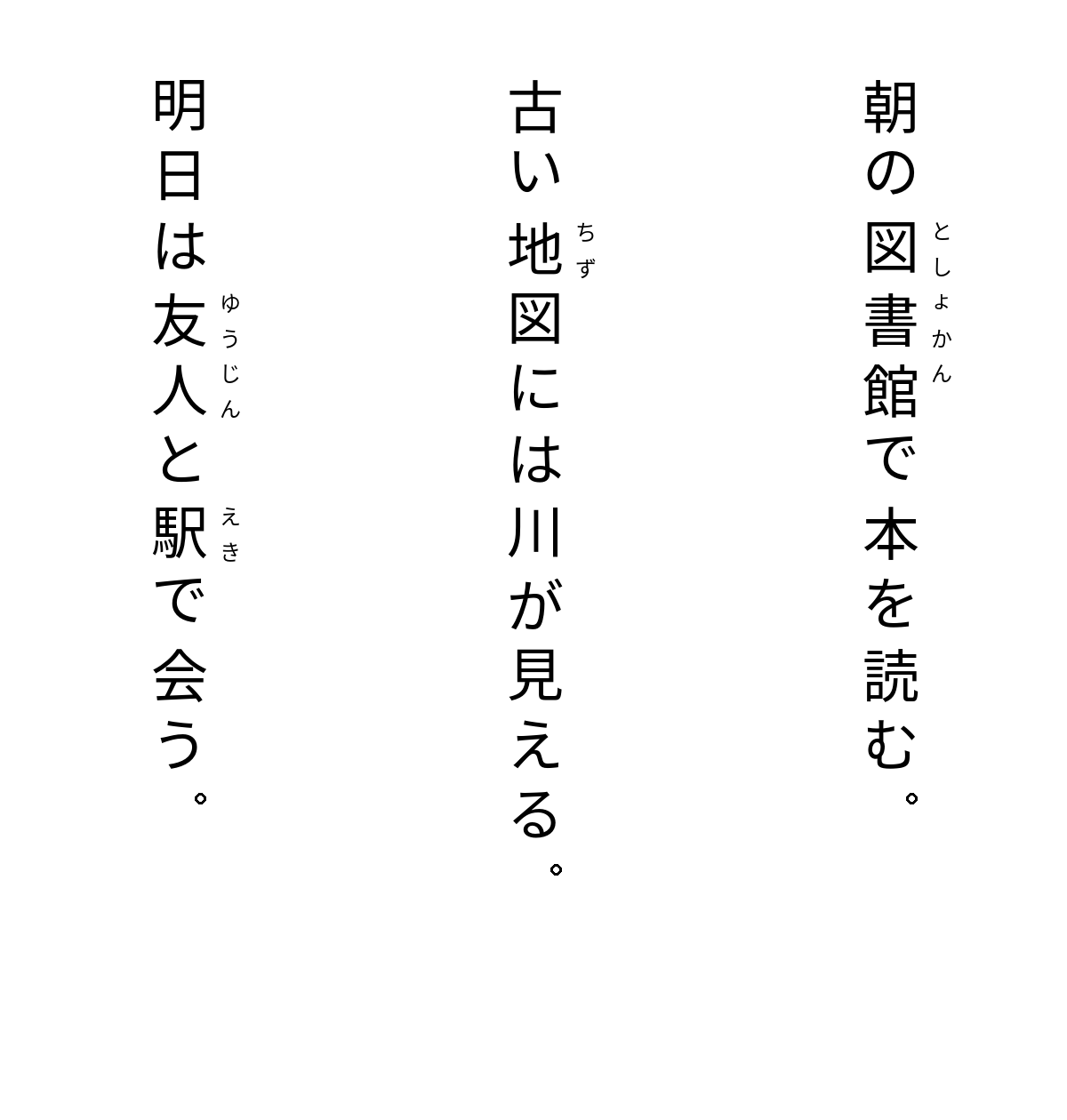
Ovo su čiste nastavne slike, a ne skenirane stranice iz knjige. Prikazivač koristi Noto Sans CJK JP, znakove tijela veličine 64 piksela, ruby od 24 piksela i pojednostavljeno okomito postavljanje znak po znak. Okomite točke iscrtava kao male obrubljene krugove na ručno odabranim položajima umjesto korištenja fontovog ispravnog okomitog pozicioniranja znakova; rezultati interpunkcije stoga ne utvrđuju kako OCR funkcionira na ispravno slogom složenoj knjizi. Ne reproducira svako pravilo japanskog slaganja sloga. U testu nema zamućenja, iskrivljenja, teksture papira, rukopisa, povijesnog tiska ni stranice s miješanim smjerom.
Mehanizam, modeli i postavke
Eksperiment je pokrenut 7. rujna 2026., koristeći Tesseract.js 7.0.0 s Tesseract.js-core 7.0.0 lokalno na macOS ARM64 sustavu. Svi uspješni pozivi koristili su službene tessdata_fast modele na verziji (commit) 87416418657359cb625c412a48b6e1d6d41c29bd, uz OEM 1, način rada koji koristi isključivo LSTM.
Službeno spremište modela za Tesseract nudi zasebne jpn i jpn_vert datoteke. Njegova dokumentacija opisuje PSM 5 kao jednoliki okomito poravnati blok, a PSM 6 kao jednoliki tekstni blok; odaberite pretpostavku segmentacije koja odgovara području koje se prepoznaje. Pogledajte dokumentaciju o segmentaciji stranica.
Naši zabilježeni slučajevi koristili su jpn s PSM 6 za vodoravni tekst, jpn_vert s PSM 5 za okomiti tekst, te namjerno neusklađenu okomitu kontrolu jpn/PSM 6. I model i segmentacija mijenjaju se između dviju okomitih konfiguracija, tako da je ovo usporedba radnog procesa, a ne eksperiment koji izolira učinak pojedine postavke.
Početni pokušaj s tessdata_best prekinut je u dostupnoj WebAssembly jezgri prije nego što je proizveo OCR tekst. Prešli smo na službene cjelobrojne tessdata_fast modele radi kompatibilnosti i zabilježili taj neuspjeh. Iz tog prijelaza ne može se izvući nikakav zaključak o točnosti pojedine obitelji modela.
Što se zapravo vratilo
Usporedba uklanja razmake i primjenjuje Unicode NFC normalizaciju. Ona ne zamjenjuje interpunkcijske znakove, ne ispravlja kanjije niti premješta tekst. Kompletan sirovi izlaz i heševi verzija/modela, CSV datoteka usporedbe tijela, i oznake pogrešaka se mogu preuzeti.
| Unos i konfiguracija | Zabilježeni rezultat u odnosu na cilj koji obuhvaća samo tijek teksta |
|---|---|
Vodoravno, jpn, PSM 6 | Svih 34 kodnih točaka podudaralo se nakon uklanjanja razmaka |
Okomito, jpn, PSM 6 kontrola | Izlaz se protezao preko stupaca i uključivao zamjene znakova; neupotrebljiv prozni tekst |
Okomito, jpn_vert, PSM 5 | Svih 34 kodnih točaka podudaralo se nakon uklanjanja razmaka; redoslijed stupaca bio je ispravan |
Okomito s furiganom, jpn_vert, PSM 5 | Glavni tekst ostao je u redoslijedu, ali su dvije 。 oznake postale ASCII .; ruby nije vraćen kao zasebno čitanje |
Tri izreza stupaca tijeka teksta iz slike s furiganom, jpn_vert, PSM 5 | Prvi stupac završavao je s ., drugi s ,, treći s 。; obrezivanje nije uklonilo sve nedostatke interpunkcije |
Na primjer, slučaj s furiganom vratio je ovu prvu liniju:
Expected: 朝の図書館で本を読む。
Observed: 朝 の 図書 館 で 本 を 読む .
Razmaci su zanemareni prema našem navedenom pravilu usporedbe. Konačna interpunkcija nije. Radni proces koji se temelji samo na pretraživanju mogao bi tolerirati tu razliku, ali vjerna transkripcija trebala bi je zabilježiti i ispraviti.
Nepodudarna okomita kontrola započela je s 明 古 昌, preskačući preko gornjih znakova stupaca umjesto da prati namjeravanu prvu rečenicu. Njezin izlaz ilustrira zašto prepoznavanje pojedinačnih simbola nije isto što i rekonstrukcija redoslijeda čitanja.
Bilo je sedam dovršenih poziva za OCR: četiri slučaja s cijelom slikom i tri izreza. Zadržali smo svaki izlaz. Jedan je agent usporedio rezultate s autoriziranom temeljnom istinom i vizualno pregledao slike; nije bilo zaslijepljenog ljudskog pregleda ni širokog korpusa mjerila. Eksperiment ne utvrđuje univerzalno najbolji mehanizam, stopu točnosti na razini knjige niti rad na vašem skeniranju.
Upotrijebite radni proces s naglaskom na regije na vlastitoj stranici
1. Sačuvajte izvor i odaberite jednu tešku stranicu
Ostavite izvornu sliku ili PDF neizmijenjenima. Radite na kopiji i zabilježite broj stranice. Odaberite stranicu koja sadrži problem koji pokušavate riješiti: gusti rubi, uski razmak između stupaca, vodoravni naslov iznad okomitog teksta ili neobično malen slog.
Čista naslovna stranica nije koristan test prihvatljivosti za knjigu čije stranice tijela teksta imaju drugačiji izgled. Ako je izvor PDF, izdvojite ili renderirajte odabranu stranicu pomoću alata kojem vjerujete prije nego što pokrenete OCR radni proces koji koristi samo slike. Skripte u ovom članku prihvaćaju PNG datoteke; ne obrađuju PDF-ove niti izrađuju slojeve PDF-a po kojima se može pretraživati.
Za cjelokupni postupak pripreme i prevođenja skeniranog dokumenta upotrijebite širi radni proces za skenirane PDF-ove. Ovaj vodič se usredotočuje na japanski smjer, segmentaciju, rubi i odluke o transkripciji.
2. Ispravite nedostatke snimanja bez uništavanja malog teksta
Pregledajte stvarne znakove pri korisnoj razini zumiranja. Izravnajte nenamjerno iskrivljenje, uklonite nepovezane rubove stranice i sačuvajte dovoljno kontrasta da biste razlikovali malu kanu i interpunkciju. Izbjegavajte tretiranje agresivnog pragiranja ili oštrenja kao automatskog poboljšanja: usporedite rezultirajuću sliku s izvornom prije nego što ukažete povjerenje OCR-u.
Tesseractove upute za kvalitetu slike pokrivaju razlučivost, šum, iskrivljenje i rubove. One su odvojene od smjera pisanja. Uklanjanje iskrivljenja sa stranice fotografirane pod kutom nije ista operacija kao bočno rotiranje uspravnog okomitog japanskog teksta.
Uzorci datoteka nose metapodatke od 300 dpi, ali taj broj ne stvara podatke koji nedostaju. Njihova stvarna veličina glifa tijela teksta iznosi 64 piksela. Fotografija niske razlučivosti s ponovno označenom oznakom „300 dpi” i dalje je ista fotografija niske razlučivosti.
3. Odvojite regije kada stranica krši jednu pretpostavku izgleda
Isprobajte glavni okomiti blok samostalno prije nego što zatražite od jednog poziva za OCR da obradi vodoravni naslov, okomitu prozu, ilustraciju i broj stranice. Zadržite jednostavan zapis regije kao što je „stranica 12, tijelo teksta, 1. stupac s desne strane”. Taj zapis čini kasniju montažu provjerljivom.
Za materijal miješanog smjera prepoznajte vodoravnu regiju s odgovarajućom vodoravnom postavkom, a okomitu regiju s okomitom postavkom, a zatim ih složite onim redoslijedom kako dokument namjerava. Ovo je preporučeni radni proces za testiranje na vašoj datoteci, a ne mogućnost miješanog izgleda mjerena našim trima slikama uzoraka.
Naš eksperiment s izrezima koristio je točne poznate koordinate kako bi se isključila traka rubija pored svakog sintetičkog stupca, a zadržali tekst tijela teksta i bijela margina. Bila je to demonstracija ručnog odabira regija, a ne automatski algoritam za uklanjanje furigane. Nemojte primjenjivati njegove koordinate na stvarnu stranicu knjige.
4. Provjerite stupce prije lektoriranja pojedinačnih znakova
Usporedite prvi i posljednji znak tijela teksta svakog stupca, radeći u namjeravanom smjeru. Potvrdite da nijedan stupac ne nedostaje, da nije dupliciran, obrnut ili pomiješan sa susjednim. Zatim pregledajte rečenice na granicama stupaca.
Tek nakon toga trebate ispraviti pojedinačne kanjije, kane, interpunkciju, brojeve i imena. U suprotnom možete potrošiti vrijeme na dotjerivanje ulomaka koji su složeni u krivi odlomak.
Korisna provjera u tri prolaza je:
- Regije i redoslijed: svaka željena regija tijela teksta prisutna je jednom i u nizu.
- Znakovi: usporedite stvarnu sliku s tekstom, uključujući malu interpunkciju i oznake kana.
- Bilješke: odlučite hoće li se svaka ruby stavka, bilješka ili rubna oznaka sačuvati, odvojiti ili namjerno isključiti.
Vrijednost pouzdanosti stroja nije zamjena za ove provjere. Naša izmiješana kontrola i dalje je vratila broj pouzdanosti koji je prijavio stroj; to nije učinilo njegov redoslijed čitanja prihvatljivim.
Nemojte uklanjati furiganu dok ne saznate zašto
Za ekstrakciju samo tijela teksta, ruby ne bi trebao slučajno postati drugi sloj proze. Ali brisanje svakog malog niza kana nije sigurno opće pravilo. Čitanje može pomoći u razjašnjavanju imena, očuvanju izbora izgovora od strane autora ili podržavanju čitateljevog zadatka učenja.
U našoj slici s furiganom, izlaz OCR-a sadržavao je glavni kanji, ali nije vratio četiri čitanja kao zaseban skup anotacija. To bi moglo biti dovoljno nakon korekcije interpunkcije za zadatak pretraživanja samo tijela teksta. Nedovoljno je ako isporuka obećava informacije o izgovoru.
Spremite važna čitanja odvojeno i povežite ih s pravim pojavljivanjem. Na primjer:
Page: sample 1
Column: 1 from the right
Base text: 図書館
Reading shown: としょかん
Decision: retain body text; save reading in the annotation record
Uzorak zasebna ruby transkripcija čini tu politiku eksplicitnom. To je temeljna istina stvorena sa slikom, a ne tvrdnja o uspjehu OCR-a.
Ako OCR pomiješa kane u riječ ili izgubi njihovu povezanost, usporedite sa slikom i popravite transkripciju. Nemojte tražiti od jezičnog modela da pogađa izvor i predstavlja nagađanje kao oporavljeni tekst. Umjesto toga označite nesigurno čitanje za pregled.
Rezultati izrezivanja također govore protiv pojednostavljenog pravila „ukloni ruby i sve se poboljšava“: ostale su dvije razlike u interpunkciji, a pogođeni završeci rečenica su se promijenili. To zapažanje pripada ovom određenom čistom uzorku. Ono nam govori da provjerimo rezultat nakon segmentacije, a ne da izrezivanje općenito pomaže ili šteti OCR-u.
Reproducirajte test ili vodite zapisnik pregleda
Preuzmite README eksperimenta za fiksirane izvore modela i fontova, verzije ovisnosti, opise datoteka i naredbe. generator uzoraka, izvršitelj OCR-a, i skriptu za usporedbu odvojeno stvaranje slika, prepoznavanje i procjenu.
Izvršitelj koristi dokumentirani Tesseract.js radni API. Za okomito područje, njegove ključne postavke su:
const worker = await createWorker("jpn_vert", 1, {
  langPath: modelDirectory,
  gzip: false,
  cacheMethod: "none",
});
await worker.setParameters({
  tessedit_pageseg_mode: "5",
  user_defined_dpi: "300",
});
modelDirectory mora sadržavati preuzetu, neraspakiranu jpn_vert.traineddata datoteku. Ovo je izvadak, a ne cijeli program; isporučeni izvršitelj također sprema sirove rezultate i prekida radne procese.
Ako koristite drugu OCR aplikaciju, zadržite iste dokaze čak i kada se nazivi postavki razlikuju: izvorno područje, originalna datoteka, verzija modela ili alata, smjer, izbor segmentacije, stvarni izlaz, ispravljeni tekst i neriješeni znakovi. Predložak dnevnika pregleda je prazan kako ne bi implicirao da su vaše stranice već prošle provjeru.
Nemojte pretvarati naš mali rezultat s točnim podudaranjem u obećani postotak za cijeli roman. Različiti fontovi, zagušeni stupci, povijesni oblici, skeniranja niske kvalitete i oblačići s govorom u mangama zahtijevaju vlastite reprezentativne testove. Raspored mangi i prepoznavanje rukopisa izvan su ovog eksperimenta.
Prevodi samo kada je oporavljeni izvor pouzdan
Ako vam je cilj pretraživanje, kopiranje citata ili pretraživanje u rječniku, verificirani japanski tekst može biti konačni rezultat. Ne morate prevoditi cijeli dokument samo zato što je bio uključen OCR.
Ako je jezična barijera i dalje prepreka čitanju, a imate upotrebljivu datoteku koju možete učitati, nastavite s tijekom rada za prevođenje PDF-a. Zadržite izvorno skeniranje i provjerenu transkripciju kako biste mogli razlikovati pogreške u prepoznavanju od pogrešaka u prevođenju. Uzorak izvršitelja proizvodi tekstualne i TSV datoteke, a ne PDF spreman za automatsko učitavanje; pripremite stvarni ulazni format koji vaš sljedeći alat zahtijeva.
OCR način rada aplikacije BookTranslator rekonstruira prevedeni sadržaj umjesto da jamči izvorni okomiti raspored. Nemojte pretpostavljati da će sačuvati svaku rubi udrugu ili popraviti neprovjerene pogreške u prepoznavanju. Pregledajte redoslijed čitanja i oblikovanje konačnog dokumenta koristeći vodič za očuvanje PDF formata i kontrolni popis za završnu PDF provjeru kvalitete.
Pouzdana predaja nije „OCR je dovršen.“ To je „namjeravajući japanski tekst je prisutan, njegov redoslijed je provjeren, a postupanje s bilješkama je dokumentirano.“
Povezane objave